MyBatis
MyBatis에 대해서 적어봤습니다.
주제 선정 이유
백엔드를 공부하다 보면 자연스럽게 데이터베이스를 다루게 되며, JDBC를 통해 기본적인 연동 방식을 익히게 되고 이후 JPA나 MyBatis 같은 영속성 프레임워크를 접하게 되며 어떤 기술을 더 깊게 이해해야 할지 고민하게 됩니다.
객체지향 중심의 JPA 또한 매력적인 선택지이지만, 상황에 따라 유연하게 변하는 동적 쿼리를 직접 설계하고 제어할 수 있는 방식에 더 흥미를 느끼게 되며, 단순히 프레임워크를 사용하는 것을 넘어 SQL을 직접 다루고 최적화하는 과정에
대해 먼저 이해해보고 싶다는 생각이 들게 됩니다.
또한 실제 서비스에서는 복잡한 조건과 다양한 요구사항에 따라 쿼리가 동적으로 변화하게 되며, 이러한 흐름을 코드
레벨에서 어떻게 처리하는지에 대해 이해하는 것이 중요하다고 느끼게 되고, 그 과정에서 MyBatis가 어떤 방식으로 SQL을 관리하고 자바 객체와 매핑하는지에 대한 궁금증이 생기게 됩니다.
그래서 이번 글에서는 MyBatis를 중심으로 동적 SQL 처리 방식과 내부 동작 흐름을 살펴보면서, 데이터 접근 계층에서 어떤 역할을 수행하는지에 대해 정리해보고자 합니다.
MyBatis가 뭘까?

개발자가 지정한 SQL, 저장 프로시저, 그리고 고급 매핑을 지원하는 영속성 프레임워크인데 기존 JDBC 방식에서는
자바 코드 안에 SQL문이 섞여 있어 관리가 어려웠지만, MyBatis는 이를 분리하여 관리할 수 있게 해줍니다.
데이터베이스 레코드를 자바의 원시 타입, Map 인터페이스, 자바 POJO에 자동으로 매핑하기 위해 xml과 애노테이션을 사용합니다.
여기서 POJO(Plain Old Java Object)란 특정 프레임워크, 인터페이스를 상속받지 않는 순수 자바 객체를 의미합니다.
편해진 점
1
2
3
String sql = "update item " +
	   "set item_name=:itemName, price=:price, quantity=:quantity " +
	   "where id=:id";
JDBC에서는 쿼리를 붙여서 사용해야 했던 반면에 MyBatis에서는
1
2
3
4
5
6
7
<update id="update">
    update item
    set item_name=#{itemName},
        price=#{price},
        quantity=#{quantity}
    where id = #{id}
</update>
이런식으로 +를 붙히지 않아도 되고 라인이 길어져도 불편함이 없습니다.
1
2
3
4
5
6
7
8
9
10
11
12
13
14
15
16
17
18
19
20
String sql = "select id, item_name, price, quantity from item";

if (StringUtils.hasText(itemName) || maxPrice != null) {
    sql += " where";
}

boolean andFlag = false;
if (StringUtils.hasText(itemName)) {
    sql += " item_name like concat('%',:itemName,'%')";
    andFlag = true;
}
if (maxPrice != null) {
	if (andFlag) {
	    sql += " and";
  }
  sql += " price <= :maxPrice";
}

log.info("sql={}", sql);
return template.query(sql, param, itemRowMapper());
그리고 이런식으로 JDBC에서는 동적 쿼리를 작성해야 했던 반면에 MyBatis에서는
1
2
3
4
5
6
7
8
9
10
11
12
<select id="findAll" resultType="Item">
select id, item_name, price, quantity
from item
<where>
<if test="itemName != null and itemName != ''">
and item_name like concat('%',#{itemName},'%')
</if>
<if test="maxPrice != null">
and price <= #{maxPrice}
</if>
</where>
</select>
이런식으로 자바 코드와 SQL을 완전히 분리할 수 있습니다.
주요 구성 요소
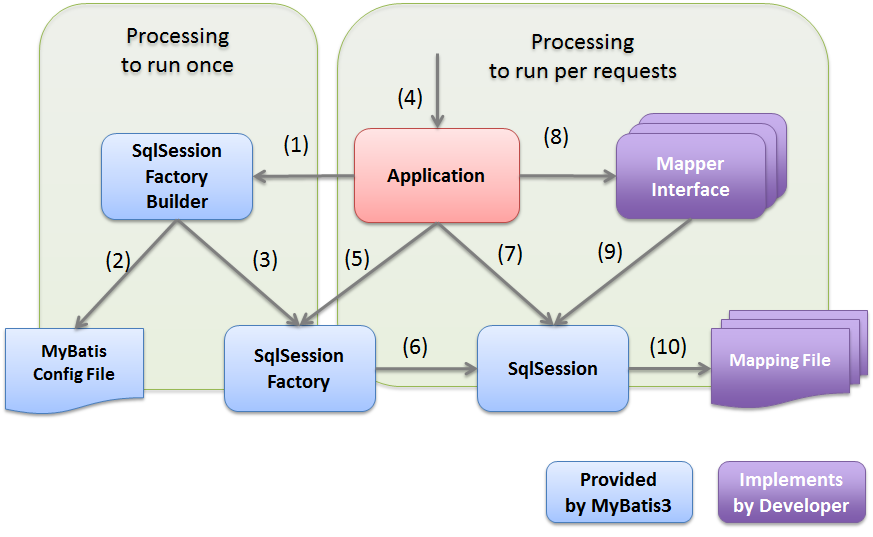
어떻게 SQL을 처리하는지 이해하려면, 세 가지 객체의 역할을 알아야 합니다.
SqlSessionFactoryBuilder
설정 파일을 읽어와서 SqlSessionFactory라는 공장을 짓는 역할을 하고 그 공장이 다 지어지면 자신의 임무를 마치고 사라지는 일시적인 객체입니다.
SqlSessionFactory
SqlSession을 찍어내는 공장인데 애플리케이션 실행 시점에 한 번만 생성되어 프로그램이 끝날 때까지 유지되며,
데이터베이스 연결(Connection)과 SQL 실행에 필요한 모든 정보를 쥐고 있는 핵심 저장소입니다.
SqlSession
실제 SQL 문을 실행하고 트랜잭션을 관리하는 객체인데 SqlSessionFactory로부터 생성되어 하나의 요청을 처리한 뒤 반드시 소멸되어야 하는 일회용 작업자입니다.
설정
mybatis-spring-boot-starter라는 라이브러리를 사용하면 MyBatis를 스프링과 통합하고, 설정도 아주 간단히 할 수 있습니다.
1
2
3
4
5
6
7
8
9
10
11
12
13
14
15
16
17
18
19
20
21
22
23
24
25
26
27
28
plugins {
	id 'org.springframework.boot' version '2.6.5'
	id 'io.spring.dependency-management' version '1.0.11.RELEASE'
	id 'java'
}

group = 'com.example'
version = '0.0.1-SNAPSHOT'
sourceCompatibility = '11'

configurations {
	compileOnly {
		extendsFrom annotationProcessor
	}
}

repositories {
	mavenCentral()
}

dependencies {
	implementation 'org.springframework.boot:spring-boot-starter-web'
	implementation 'org.mybatis.spring.boot:mybatis-spring-boot-starter:2.2.0'
}

tasks.named('test') {
	useJUnitPlatform()
}
| 라이브러리 | 설명 |
|---|---|
| mybatis-spring-boot-starter | Spring Boot에서 MyBatis를 쉽게 사용할 수 있도록 필요한 의존성과 설정을 자동으로 구성 |
| mybatis-spring-boot-autoconfigure | MyBatis와 Spring Boot를 연동하기 위한 자동 설정을 제공하는 라이브러리 |
| mybatis-spring | MyBatis와 Spring을 통합하여 사용할 수 있도록 지원하는 라이브러리 |
| mybatis | MyBatis의 핵심 기능을 제공하는 기본 라이브러리 |
이렇게 하면 MyBatis를 스프링에서 사용할 수 있는 라이브러리까지는 준비가 되었습니다.
환경 설정 및 프로젝트 구조
이제 스프링에게 MyBatis 관련 설정을 전달해야 합니다.
application.properties
1
2
3
4
5
6
7
8
# MyBatis 매퍼 파일 위치 설정 (resources/mapper 폴더 안의 모든 XML 인식)
mybatis.mapper-locations=classpath:mapper/**/*.xml

# 결과 객체의 패키지 경로를 축약할 수 있도록 설정 (Alias 설정)
mybatis.type-aliases-package=com.example.itemservice.domain

# 언더스코어(_) 네이밍을 카멜 케이스(camelCase)로 자동 변환
mybatis.configuration.map-underscore-to-camel-case=true
프로젝트 구조
가장 표준적인 폴더 구조는 자바 코드와 SQL 파일을 분리하는 것이 핵심입니다.
src/main/javamapper.ItemMapper- 인터페이스 (메서드 정의)
1
2
3
@Mapper
public interface ItemMapper {
}
src/main/resourcesmapper/ItemMapper.xml- xml 파일 (실제 SQL 작성)
1
2
3
4
5
<?xml version="1.0" encoding="UTF-8"?>
<!DOCTYPE mapper PUBLIC "-//mybatis.org//DTD Mapper 3.0//EN"
    "http://mybatis.org/dtd/mybatis-3-mapper.dtd">
<mapper namespace="com.example.itemservice.repository.mapper.ItemMapper">
</mapper>
이렇게 코드를 작성할 준비를 모두 마쳤습니다.
MyBatis는@Mapper가 붙은 인터페이스를 스캔하여 XML에 정의된 SQL과 매핑하며, XML의namespace는 해당
인터페이스의 전체 경로와 일치해야 하고 각SQL태그의id는 인터페이스의 메서드 이름과 동일해야 하며, 이를
기준으로MyBatis가 메서드와 쿼리를 연결합니다.
그래서 어떻게 쓰라고?

이제 설정한 구조에 맞춰 실제 코드를 어떻게 작성하는지 살펴보겠습니다.
정적 쿼리
우선 SQL의 구조가 고정되어 있는 정적 쿼리의 작성법을 알아보겠습니다.
Mapper 인터페이스 (Java)
1
2
3
4
5
6
7
8
@Mapper
public interface ItemMapper {

    void save(Item item);

    void update(@Param("id") Long id, @Param("updateParam") ItemUpdateDto updateParam);

}
Mapper xml
1
2
3
4
5
6
7
8
9
10
11
12
13
14
15
16
17
18
<?xml version="1.0" encoding="UTF-8"?>
<!DOCTYPE mapper PUBLIC "-//mybatis.org//DTD Mapper 3.0//EN"
        "http://mybatis.org/dtd/mybatis-3-wrapper.dtd">

<mapper namespace="com.example.itemservice.repository.mapper.ItemMapper">
    <insert id="save" useGeneratedKeys="true" keyProperty="id">
        insert into item (item_name, price, quantity)
        values (#{itemName}, #{price}, #{quantity})
    </insert>

    <update id="update">
        update item
        set item_name = #{updateParam.itemName},
            price = #{updateParam.price},
            quantity = #{updateParam.quantity}
        where id = #{id}
    </update>
</mapper>
| 항목 | 설명 |
|---|---|
useGeneratedKeys="true"keyProperty="id" | DB가 생성한 키를 객체 id에 자동 설정 |
#{...} | PreparedStatement 기반 안전한 파라미터 바인딩 |
@Param | 여러 파라미터를 XML에서 구분하기 위한 이름 지정 |
동적 쿼리
상황에 따라 SQL 문이 유연하게 변해야 하는 동적 쿼리의 작성법을 알아보겠습니다.
if
특정 조건이 만족될 때만 SQL 조각을 포함시킵니다.
1
2
3
<if test="itemName != null and itemName != ''">
    and item_name like concat('%', #{itemName}, '%')
</if>
test 속성 안의 자바 조건식이 true일 때만 해당 SQL이 쿼리에 추가됩니다.
choose (when, otherwise)
여러 조건 중 단 하나만 선택하여 실행하고 싶을때 사용합니다.
1
2
3
4
5
6
7
8
9
10
11
<choose>
    <when test="itemName != null">
        and item_name = #{itemName}
    </when>
    <when test="price != null">
        and price = #{price}
    </when>
    <otherwise>
        and featured = true
    </otherwise>
</choose>
상단부터 조건을 검사하며 가장 먼저 만족하는 <when>하나만 실행되고 모든 조건이 맞지 않으면 <otherwise>가
실행됩니다.
trim (where, set)
SQL 문법 오류 (불필요한 AND, OR, 콤마 등)을 자동으로 해결해 줍니다.
1
2
3
4
5
6
7
8
9
10
11
12
13
14
<where>
    <if test="itemName != null">
        and item_name = #{itemName}
    </if>
</where>

<update id="update">
    update item
    <set>
        <if test="itemName != null">item_name = #{itemName},</if>
        <if test="price != null">price = #{price},</if>
    </set>
    where id = #{id}
</update>
<where>은 내용이 있을 때만 WHERE 키워드를 생성하고, 첫 번째 조건의 AND를 알아서 지워주고 <set>은 수정(update)쿼리에서 마지막 콤마(,)를 지워주는 역할을 합니다.
foreach
List나 Array 같은 컬렉션을 반복하여 IN 절 같은 쿼리를 만들 때 사용합니다.
1
2
3
4
5
6
<select id="findInIds" resultType="Item">
    select * from item where id in
    <foreach item="id" collection="ids" open="(" separator="," close=")">
        #{id}
    </foreach>
</select>
전달받은 리스트를 순회하며 (1, 2, 3)과 같은 형태를 자동으로 만들어 줍니다.
추가
특수 문자 처리
| 특수문자 | 엔티티 명칭 | XML 작성 예시 |
|---|---|---|
< | < | price <= #{maxPrice} |
> | > | price > #{minPrice} |
& | & | status = 'A' &amp; status = 'B' |
" | " | 쌍따옴표 표현 시 |
' | ' | 홀따옴표 표현 시 |
1
2
3
4
5
6
7
8
9
10
11
12
13
14
<select id="findAll" resultType="Item">
    select id, item_name, price, quantity
    from item
    <where>
        <if test="itemName != null and itemName != ''">
            and item_name like concat('%',#{itemName},'%')
        </if>
        <if test="maxPrice != null">
						<![CDATA[
            and price <= #{maxPrice}
            ]]>
        </if>
    </where>
</select>
특수 문자가 너무 많다면 <![CDATA[ <= ]]>와 같이 CDATA 구문을 사용하는 방법도 있습니다만 쓰면 xml tag가 단순
문자로 인식되기 때문에 <if>, <where>등이 적용되지 않습니다.
애노테이션
XML 대신에 애노테이션에 SQL을 작성할 수 있습니다.
1
2
@Select("select id, item_name, price, quantity from item where id=#{id}")
Optional<Item> findById(Long id);
@Insert, @Update, @Delete @Select 기능이 제공되며 이 경우 XML에는 <select id=”findById”> ~ </select>는 제거해야 하고 동적 SQL이 해결되지 않기 때문에 간단한 경우에만 사용해야 합니다.
문자열 대체
#{} 문법은 ?를 넣고 파라미터를 바인딩하는 PreparedStatement를 사용하는데 때로는 파라미터 바인딩이 아니라
문자 그대로를 처리하고 싶은 경우에는 ${}를 사용하면 됩니다.
1
2
@Select("select * from user where ${column} = #{value}")
User findByColumn(@Param("column") String column, @Param("value") String value);
그대신 Sql Injection 공격을 당할 수 있으므로 가급적 사용하면 안됩니다.
재사용 가능한 SQL
1
2
3
4
5
6
7
8
9
10
11
12
13
14
15
16
17
<sql id="sometable">
  ${prefix}Table
</sql>

<sql id="someinclude">
  from
    <include refid="${include_target}"/>
</sql>

<select id="select" resultType="map">
  select
    field1, field2, field3
  <include refid="someinclude">
    <property name="prefix" value="Some"/>
    <property name="include_target" value="sometable"/>
  </include>
</select>
<sql>을 사용하면 SQL 코드를 재사용 할 수 있는데 <include>라는 태그를 통해서 <sql> 조각을 찾아서 사용할 수
있으며 태그 안에서 사용된 name="prefix"와 같은 값은 해당 SQL 조각으로 전달되는 파라미터 역할을 합니다.
ResultMaps
결과를 매핑할 때 테이블은 안에 컬럼은 user_id이지만 객체는 id일때가 있는데 이 경우에는 컬럼명과 객체의
프로퍼티 명이 다르면 다음과 같이 별칭(as)를 사용하면 됩니다.
1
2
3
4
5
6
7
8
<select id="selectUsers" resultType="User">
  select
    user_id             as "id",
    user_name           as "userName",
    hashed_password     as "hashedPassword"
  from some_table
  where id = #{id}
</select>
별칭을 사용하지 않고도 문제를 해결할 수 있는데,resultMap을 선언해서 사용하면 됩니다.
1
2
3
4
5
6
7
8
9
10
<resultMap id="userResultMap" type="User">
  <id property="id" column="user_id" />
  <result property="username" column="user_name"/>
  <result property="password" column="hashed_password"/>
</resultMap>
<select id="selectUsers" resultMap="userResultMap">
  select user_id, user_name, hashed_password
  from some_table
  where id = #{id}
</select>
연관관계
객체 지향적인 설계를 하다보면 Member 객체가 Team객체를 가지고 있거나, Item 객체가 여러개의 Review 리스트를 가지는 경우가 많은데 이때 사용하는 방식입니다.
association
객체 안에 다른객체가 하나 포함되어 있을 때 사용합니다.
1
2
3
4
5
6
7
8
<resultMap id="itemResultMap" type="Item">
    <id property="id" column="item_id"/>
    <result property="itemName" column="item_name"/>
    <association property="factory" javaType="Factory">
        <id property="id" column="factory_id"/>
        <result property="name" column="factory_name"/>
    </association>
</resultMap>
collection
객체 안에 객체 리스트가 포함되어 있을 때 사용합니다.
1
2
3
4
5
6
7
8
9
<resultMap id="itemDetailResultMap" type="Item">
    <id property="id" column="item_id"/>
    <result property="itemName" column="item_name"/>
    <collection property="reviews" ofType="Review">
        <id property="id" column="review_id"/>
        <result property="content" column="content"/>
        <result property="star" column="star"/>
    </collection>
</resultMap>
마무리
MyBatis를 살펴보며 핵심을 다시 정리해보면 다음과 같습니다.
자바 코드 속에 섞여 있던 복잡한
SQL문을xml로 격리하여 관리함으로써, 코드의 가독성을 높이고 유지보수를
획기적으로 개선할 수 있습니다.if,where,set같은 전용 태그를 통해 마치 자바 로직처럼 쉽고 안전하게 해결할 수 있습니다.데이터베이스의 컬럼명과 객체의 필드명이 달라도,
resultMap을 활용하면 복잡한JOIN결과까지 자바의
입체적인 객체 구조로 자유롭게 매핑할 수 있습니다.MyBatis는JDBC를 대체하는 것이 아니라,JDBC의 복잡한 절차를 대신 처리해주며 개발자가SQL설계와
비즈니스 로직에만 온전히 집중할 수 있도록 돕는 강력한 도구입니다.